Table of Contents
- Step 1: Understand what SEO for restaurants in Nairobi is, and what it isn’t
- Step 2: Set up your Google Business Profile properly
- Step 3: Give your menu and location a page Google can read
- Step 4: Collect reviews and keep your details the same everywhere
- Step 5: Write about what Nairobi diners actually search
- Step 6: Check whether it’s working, and when to get help
- Your restaurant SEO checklist
- Frequently asked questions
- Your next step
- Additional resources
In short: Get your Nairobi restaurant found on Google by completing your Google Business Profile, putting your menu and each branch on readable web pages, collecting real reviews, matching your details everywhere and writing pages for what diners search. Proper results start from around month 3.
Key takeaways
- Social media keeps regulars close, while SEO reaches new diners searching for a place to eat right now.
- A menu uploaded as a PDF or photo can hide your dishes from Google, so type it onto a web page.
- Ask every real diner for a review and reply to each one, complaints included.
- Use exactly the same name, address and phone on Google, delivery apps and every other listing.
- Track profile calls, direction requests and how new diners found you, and judge results from month 3.
You post every week and people like your photos. Still, when someone nearby searches Google for a place to eat, other restaurants come up and yours doesn’t.
For you, getting found comes down to work you can start this week: your Google Business Profile, a menu Google can read, real reviews and a few pages that answer what diners type.
None of it shows overnight. You may see movement in the first weeks, and proper results start from around month 3, which also gives each change time to settle before you judge it.
By the end, you’ll have a checklist to work through yourself, and you’ll know when it makes sense to hand the work over.
Step 1: Understand what SEO for restaurants in Nairobi is, and what it isn’t
Followers and searchers are different people
Many restaurant owners I speak to think SEO means posting on Instagram and Facebook. Most Kenyan businesses see it that way, which is why so few restaurants here work on Google at all.
It’s an easy mix-up, because social media is where you see people react to you. But your followers already know you, and they like a post because it showed up in their feed.
Someone in Kilimani typing “lunch near me” hasn’t heard of you yet. Google decides which restaurants that person sees, based on what it can find, read and trust about each one.
SEO is the work of giving Google those things. It reaches people who are hungry and choosing right now, not people scrolling past.
What the work covers
For a restaurant, the work has four parts: your Google Business Profile, your website pages, your reviews and listings, and pages that answer what diners search.
Your posts keep regulars close. These four parts bring in the diner who has never walked past your door, and the next four steps take them in that order.
Step 2: Set up your Google Business Profile properly
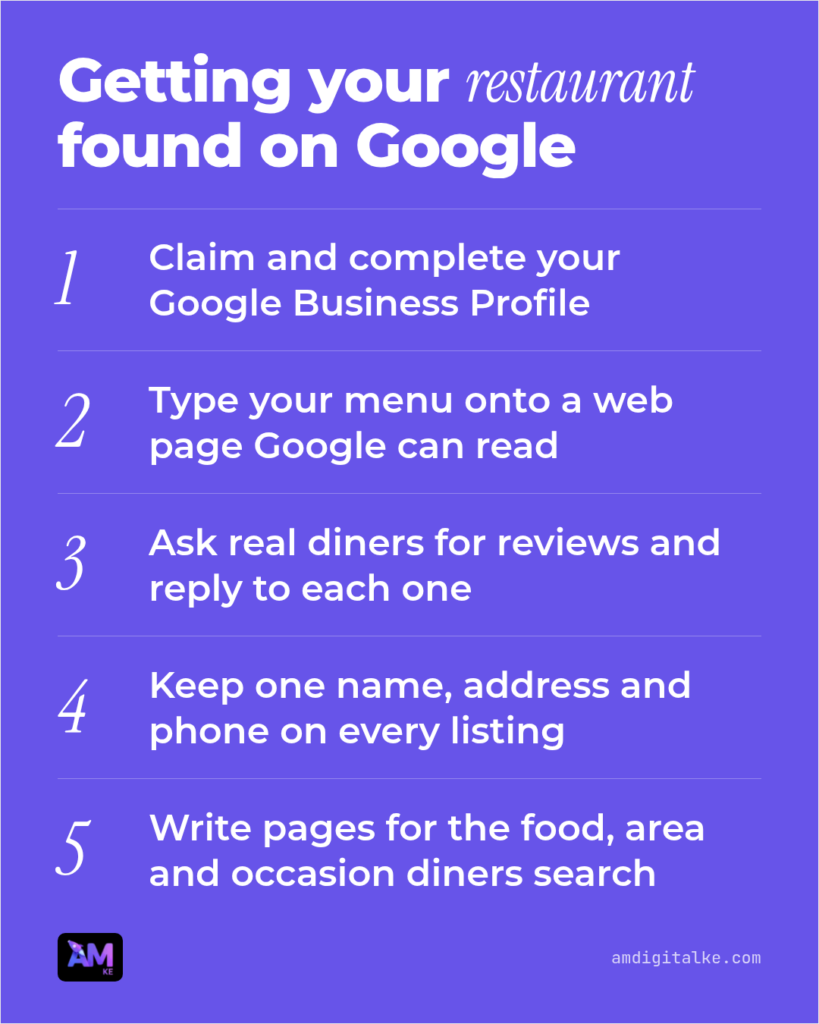
Claim or create the profile
Search Google for your restaurant’s name and area. If a profile with your name shows in the map or on the side of the results, choose the option to claim it and follow Google’s steps to verify it.
If nothing shows, create a profile on Google Business Profile with the same name your signboard uses.
Once you’re verified, you should see an edit option on your profile when you search for it while signed in.
The most common problem is a profile someone set up years ago, a former manager or a friend, with nobody holding the login. Request access through the existing profile rather than making a second one, because two profiles split your reviews.
Fill in every detail diners use
Choose a main category for the food you serve, such as “Ethiopian restaurant” or “Pizza restaurant”. Then add any others that fit, like “Takeaway”.
Add your real opening hours, including holiday hours. Add your exact address, with a landmark if your building is hard to find, and a phone number someone answers.
Link to your menu page, then upload photos of your dishes, your seating and your entrance.
You should end up with no empty sections and photos taken this year. The usual mistake is old hours: a diner who drives over and finds you closed won’t trust your listing again.
Step 3: Give your menu and location a page Google can read
Put your menu on a real web page
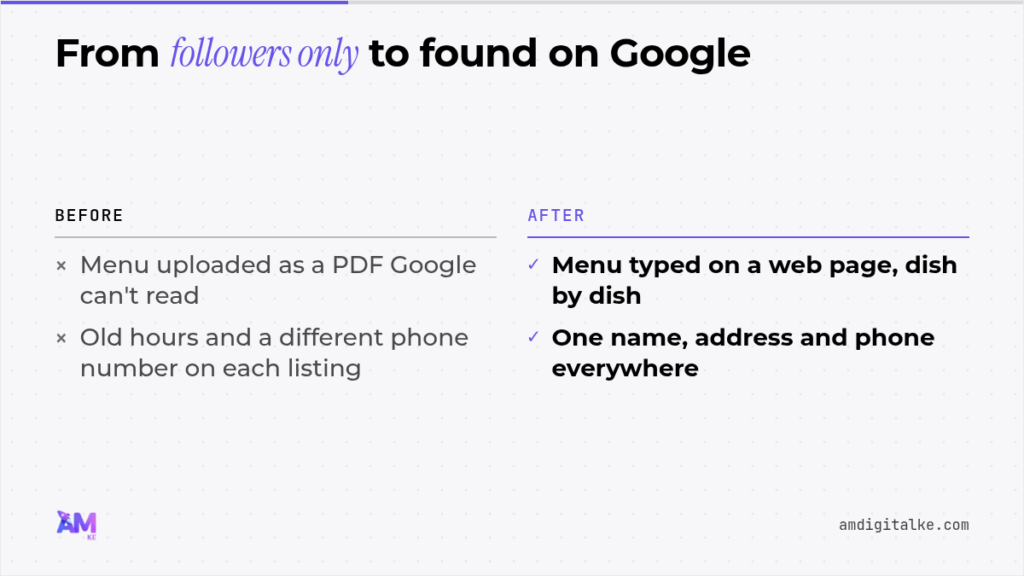
Many restaurants upload the menu as a PDF or a photo, which makes sense, since it’s the file the printer already has. The catch is that Google reads text, so your goat curry and pilau can stay hidden from someone searching for them.
Type the menu onto a web page instead: each dish, a short description and the price.
To check, try highlighting a dish name with your mouse. If it highlights like normal text, Google can read it; if the whole menu selects as one picture, it can’t.
Keep the PDF as a download for people who want to print it. A bonus of the text version is that you can change one price in a minute instead of redesigning a file.
Make a page for each branch or area
Give each branch its own page with its address, hours, phone, a map and a few lines about that place, such as parking, outdoor seating or the nearest landmark.
Give every page a clear title in the words diners type, such as “Nyama Choma Restaurant in Westlands”, not “Home” or “Branch 2”.
The common mistake is copying one page and changing only the address. Write what’s true of each place, the way I explain in service area pages for different Nairobi neighbourhoods.
Step 4: Collect reviews and keep your details the same everywhere
A weekly review routine
Reviews help a diner choose between you and the place next door. They’re also one of the things Google weighs in local results.
Ask real diners for a Google review as they pay, with a short link or a QR code in the bill folder. Ask every table, not only the happy ones.
Don’t buy reviews or write them yourself. Google can remove them, and diners can usually tell.
Reply to every review within a few days, short and calm, complaints included. A good reply to a bad review often does more for the next diner than another five stars, as I set out in building trust and rankings with reviews.
Match your name, address and phone on every listing
List every place your restaurant appears: your website, Google, Facebook, Instagram, delivery apps such as Glovo and Uber Eats, and online directories.
Pick one version of your name, address and phone, and copy it exactly onto each one.
What goes wrong most often is small: “Ltd” in one place and not another, an old number on a delivery app, or “Ngong Rd” here and “Ngong Road” there. Each difference makes Google less sure the listings are the same restaurant.
Step 5: Write about what Nairobi diners actually search
Find the searches in your diners’ own words
Think about what people ask your staff on the phone. Those questions are close to what they type into Google.
Write the searches down in three groups: the food (“best biryani in Nairobi”), the area (“restaurants in Karen”) and the occasion (“birthday dinner Nairobi”).
Say you run a grill in Westlands. Your first three pages could cover nyama choma in Westlands, group bookings for office parties, and Sunday family lunch with a kids’ area.
Write each page and link it to your menu and bookings
Answer the search in the first lines, then give what a diner needs to decide: what’s on offer, the price range, parking and how to book.
Link each page to your menu page and your booking page or WhatsApp number. Those links tell Google which pages matter and lead the reader towards a table.
The mistake I see most is writing about the restaurant instead of the search. A page called “Our Story” answers nobody’s question, while a page on office party bookings answers a real one, the same way hotels win direct bookings in Hotel SEO in Kenya.
Step 6: Check whether it’s working, and when to get help
What to expect before and after month 3
I understand that waiting is hard when rent is due every month. But SEO builds: each page and review you add keeps working long after the week you added it.
In the first weeks you may see small movement, such as more profile views or a few more direction requests. Proper results start from around month 3, so judge the work then, not after week two.
Be wary of anyone promising you the top spot or full tables within a month.
How to tell it’s working without being an expert
Once a month, note three figures from your Google Business Profile: how many people saw it, how many called and how many asked for directions.
From your website reports, note the visits that came from Google search. If those reports aren’t set up yet, my Google Analytics 4 setup guide walks you through it.
Then ask new diners how they found you, and write the answer down. SEO can bring in bookings and walk-ins because it reaches people while they’re choosing, and this habit shows you whether it does for you.
My guide on tracking what matters shows what else is worth watching.
When doing it yourself stops being practical
The profile, the menu page and the reviews are jobs you can do yourself. The writing is where most owners run out of time, because it doesn’t stop: new pages, updates and links between them.
That’s what SEO services do for a restaurant. They plan the searches to answer, write the pages, fix what’s broken on your site and report on what changed.
My plan, Managed SEO, starts from KES 80,000 a month. It includes:
- a strategy built for your restaurant, carried out with you
- up to 30 articles a month, each read and edited by a person
- 4 of your existing pages improved every month
- fixes for broken links, redirects and missing titles
- links between your own pages, added every week
- social posts made from your articles
- the SEO Brain, which you can ask anything, any day of the month
- a plain-language report and a call with you every month
Nothing goes live on your site until you approve it. It isn’t social media management: the social posts come from your SEO articles, so keep running your own Instagram.
Your restaurant SEO checklist
Work down this list in order, and tick each line off when it’s done.
- Claim or create your Google Business Profile and verify it.
- Set your category, hours, address, phone and menu link.
- Upload recent photos of your food, seating and entrance.
- Type your menu onto a web page as text.
- Make a page for each branch with its own address, hours and map.
- Ask every real diner for a review and reply to each one.
- Copy one name, address and phone onto every listing.
- Write a page for three searches your diners type.
- Note your profile figures monthly and judge results from month 3.
Frequently asked questions
Is SEO worth it for a restaurant?
It can be, and the sum is worth doing for your own place. Say each new table leaves you KES 2,000 profit after food and staff costs.
If you spend KES 80,000 a month on Managed SEO, you’d need 40 extra tables a month from Google to cover it. Diners who come back count too, and many first found you through one search.
Doing the checklist yourself costs your time rather than money, so it’s a sensible place to start.
Do I still need social media if I do SEO?
Yes. Your posts keep your regulars coming back, and that’s a job Google doesn’t do.
SEO adds a second way in, for diners who don’t follow you yet. The two work best side by side.
Your next step
Start today with your Google Business Profile: claim it, then check your hours against what’s true this week.
Before you spend anything, see how your site and city look to Google with a free, instant SEO analysis. No call is needed, and you can book one afterwards if you’d like to talk it through.
Additional resources
- Whatsapp Business Automation – Answering Customer Questions 24/7: I break down WhatsApp Business API for Kenyan businesses.
- Service Route Pages – Optimising for ‘Nairobi to Mombasa Transport’: I teach you how to build route-specific pages that rank for city-to-city transport searches.
- Service Page Copy – Selling Without Being Salesy: I show you why your service pages aren’t converting and exactly how to rewrite them with problem-solving copy that builds trust immediately.
- Property Listing Pages – SEO Best Practices for Kenyan Real Estate: Learn SEO best practices for Kenyan property listing pages.
- Auto Service SEO – Attracting Local Repair and Maintenance Customers: I show auto service shops how to rank first when drivers search for urgent repairs.
- Marketing Workflows That Scale Your Kenyan Business: I show you how to stop spending 4 hours daily answering the same questions.