
Free Google Sheets Template
Start Tracking Which Marketing Channels Work
Track ROI, identify winners, optimize your budget. A simple spreadsheet that shows you exactly where your marketing money goes.

What to Expect from your Free Google Sheet Template
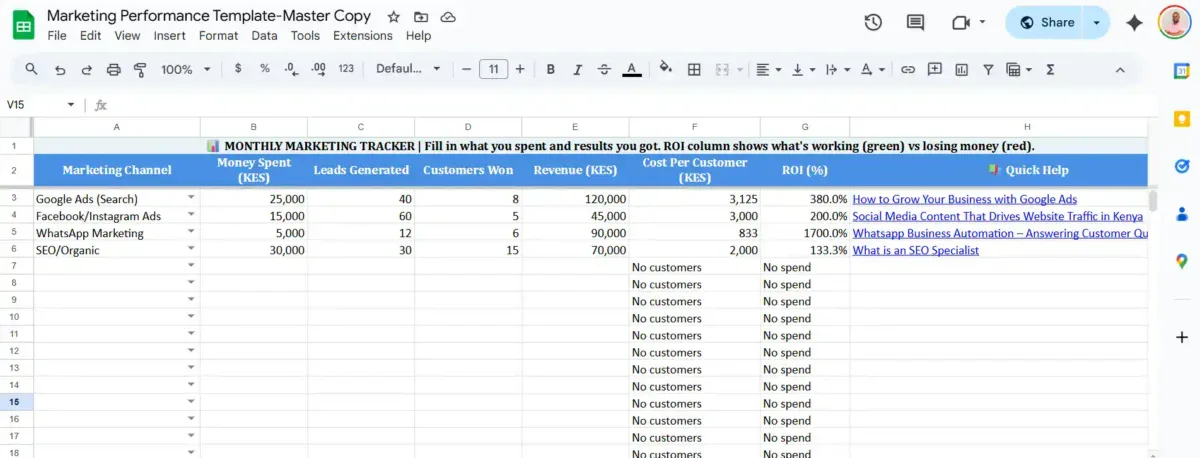
Here is a Breakdown
What You’ll Get
Monthly Tracker
Simple spreadsheet to log your marketing spend, leads, customers, and revenue per channel. Auto-calculates Cost Per Customer and ROI.
Performance Dashboard
Instant overview of which channels are winning (green) vs losing money (red). See your best and worst performers at a glance.
Budget Reallocation Insights
Personalized recommendations showing where to cut spending and where to invest more for better returns.
Channel Synergy Calculator
Side-by-side comparison showing why combining SEO + Social Media outperforms either channel alone. Includes month-by-month projections.
Complete Instructions
Plain-English guide on what each metric means, how to track leads, and tips for consistent monthly updates.
Free Updates
Template hosted on Google Sheets means you always have the latest version with any improvements we make.

How to Use This Template
- STEP 1: Make a copy (File → Make a Copy)

- STEP 2: Go to Monthly Tracker tab and delete example data
- STEP 3: At month-end, enter your actual marketing spend and results
- STEP 4: Watch Cost Per Customer and ROI calculate automatically

- STEP 5: Review Summary Dashboard for insights
- STEP 6: Repeat monthly to spot trends
More screenshots available in the Sheet.
Get the Template
Stop Guessing. Start Tracking Your Marketing Channels
Most Kenyan businesses waste 6-12 months trying random tactics. Take 2 minutes now to find your path.
Download Template →